Samsung Galaxy S3 Mini Review and Specs

Samsung Galaxy S3 Mini Review and Specs - Guys, after the success of the Galaxy S3, Samsung finally launches Galaxy S3 Mini. Samsung Galaxy S3 Mini is Galaxy S3s younger brother. This product has been successfully launched in Germany. Galaxy S3 Mini has the specs are not too different from the previous product. With mini design, of course, the price of Samsung Galaxy S3 is also a mini. Ok guys, lets talk about it.

Samsung Galaxy S3 Mini Review and Specs

Design

Samsung Galaxy S3 Mini comes with a smaller than the previous product and feature organic design inspired by nature. Its the same as the Galaxy S3 inspired by nature too. The dimensions of the Samsung Galaxy S3 Mini is 121.6 x 63 x 9.9 mm, 111.5 grams; plastics material; full touchscreen; button power/lock; 3.5 mm audio port; microUSB port; mic hole, volume rocker (around the phone from the top) 1 and 2 home button below the touch button screen (menu and back).

Samsung Galaxy S3 Mini has a plastic material that is similar to the Galaxy S3. On the smartphone, there are some changes. Samsung screen on the front besides putting 1 and 2 home button below the touch buttons (menu and back). Mic hole and microUSB port and volume rocker is located under the left. 3.5 mm audio port at the top, the power button/lock on the right. And the rear camera hole Samsungs put speakerphone and LED flash.

Samsung Galaxy S3 Mini Review and Specs

Screen : 4.0 Amoled Display

Its so beautiful, Galaxy S3 Mini has 4.0-inch Super AMOLED, 16 million colors, multi touch, 480 x 800 pixels, 4.0 inches (~ 233 ppi pixel density). This allows you to see a variety of multimedia content with sharp and clear images. You can seeing reality in the world guys.

Android : Jelly Bean (4,1)

Samsung Galaxy S3 Mini has a different OS than the Galaxy S3. Galaxy S3 Mini has been using the Jelly Bean OS (4.1). By Jelly Bean OS, users can do things perfectly. Jelly Bean is the most popular OS for worlds smartphones. Jelly Bean presents a variety of appropriate information before you even ask and give you a new experience.

Water moving animation effects when touched nothing on this smartphone. But it doesnt really matter, because the Samsung Galaxy S3 Mini has a powerful OS.

Processor and Memory

Samsung Galaxy S3 Mini has Dual-core 1 GHz Cortex-A9, NovaThor U8420 chipset, Mali-400GPU, RAM: 1 GB RAM. For memory, this smartphone had  Internal Storage: 8/16GB, external: microSD up to 32GB, 1500mAh battery. Galaxy S3 Mini only has two memory options, that is 8 and 16 GB. This is especially relevant when considering the shape this is a small smartphone.

Camera

For camera, Samsung Galaxy S3 Mini carries 5 MP, 2592x1944 pixels, LED flash, autofocus, Geo-tagging, touch focus, face detection; 720p @ 30fps video recorder; VGA secondary camera. In the camera sector, the most interesting feature is you can record video and shooting at the same time. With 5 MP, Galaxy S3 has great pictures and sharp.

Samsung Galaxy S3 Mini Review and Specs

Multimedia Player

Galaxy S3 has some advanced multimedia features such as Pop-Up Play, Sound Alive and S Voice. Pop Up Play has function to run other applications while youre using an application like when you watch a video while sending a message. Sound Alive is a features like equalizer that lets you choose the sound you want. SVoice has function to do what you are commanded, just by using your voice. You can play the music you want or automatically launched the camera and then start taking your photos.

Connectivity

For the connectivitys problem, Samsung Galaxy S3 Mini had GPRS, EDGE, HSDPA 14.4 Mbps, HSUPA 5.76 Mbps; Wi-Fi 802.11 a/b/g/n, dual-band, DLNA, Wi-Fi hotspot; Wi-Fi Direct, Bluetooth v4.0 with A2DP, LE, EDR ; microUSB v2.0, S Beam, Multi tabs, bookmarks, history, Flash player, HTML, share page, incognito, pinch zoom, print, downloads, desktop view, save for offline reading. With this connectivity, the Samsung Galaxy S3 Mini has great speed when in a WiFi or HSDPA network.

Conclusion

In general, the Samsung Galaxy S3 Mini is similar to the Samsung Galaxy S3, its just a smaller form of the Galaxy S3. However, this makes it easy when carrying anywhere and is suitable for a small bag. Option for you guys.


Download Here Samsung Galaxy S3 Mini Review and Specs
Get The Smartphone Here
Read More..

Download Theme Aqua Surprise for Nokia 5800 N97 5530 and X6

Aqua Surprise is a nice theme for Symbian S60 5th edition based phones from Nokia. The theme is based on underwater graphics. On the homescreen, you get a lovely and innocent fish surprised by seeing fish hook.


Aqua Surprise theme comes with heavy designed custom 3D icons. These 3D icons are really very beautiful and make this theme a must to have on your phones. These 3D Icons are designed by intheme c.studio. The theme though is not lightweight but works ok.


Aqua Surprise theme works with Nokia 5800 XpressMusic, N97, N97 Mini, X6, 5228, 5230, 5233, 5235 and 5530 XpressMusic. Download and try this theme on your phones.

Theme Aqua Surprise for Nokia 5800 XpressMusic and N97 (3.5 MB)

Related Posts:
Read More..

Download Application Jai Shree Ram for Nokia 5800 N97 X6 5530 and N8

Jai Shree Ram is a devotional Java based application for Symbian^3 and Symbian S60 5th edition touch screen mobile phones. The application is based on Lord Rama, one of the most commonly adored gods of Hindus and is known as an ideal man and hero of the epic Ramayana.


Shree Ram is always holding a bow and arrow indicating his readiness to destroy evils. He is also called "Shri Rama". The application lets you see the photo gallery of Shree Ram. You can also do Pooja (Pray) and/or Aarti. You can read Chalisa, Janma Stuti, etc.


The application is very beautifully designed. The application is developed by East Innovations. The application works with Nokia 5800 XpressMusic, N97, N97 Mini, X6, 5228, 5230, 5233, 5235, 5530 XpressMusic, N8, E7, C6 and C7. The version 1.0.0 of Jai Shree Ram application is available to download.

Application Jai Shree Ram for Nokia 5800 XpressMusic and N97 (1.2 MB)
Related Posts:
Read More..

Download Application SCam Free for Nokia 5800 X6 and N8

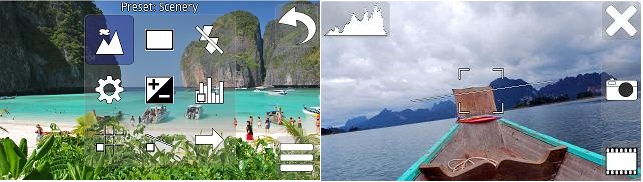
SCam Free is a very fast and easy to use camera application for Symbian S60 5th and Symbian^3 based touchscreen smartphones from Nokia. The application supports both back and front camera as well as both portrait and landscape screen orientations.


Captured images are zoomable and last shot image can be viewed any time. The application has all the normal camera settings available along with several advanced features including real-time histogram, horizon line, time lapse, exposure bracketing, movement detection and autofocus lock. The supported features listed here may vary between devices based on different OS versions.


SCam Free is an application from Ton Nam Software. From the settings, it can be configured to start from camera button press. You will experience the best experience on Symbian^3 devices, but  it works perfectly on S60 5th edition and also on all S60 3rd edition devices with at least QVGA display resolution.


SCam Free application works with Nokia 5800 XpressMusic, N97, N97 Mini, X6, 5228, 5230, 5233, 5235, 5530 XpressMusic, E63, E71, N8, E7, C6 and C7. The version 1.2.0 of SCam Free app is available to download.

Application SCam Free for Nokia 5800 XpressMusic and N97 (197 KB)
Related Posts:
Read More..

Download Application Reset Network for Nokia 5800 X6 and N8

Reset Network is an application for Symbian^3 and Symbian S60 5th edition based touchscreen mobile phones. The application restart the network of your phone with just one touch! The application changes the network state to first offline and then back to online.


Reset Network initiates a search of new base station service provider, which can significantly improve the quality of the signal specially very useful in area of low network coverage. You no longer need to restart your phone just to make network working.

The application can be put in shortcuts for quick access as there is no user interface. The application works with Nokia 5800 XpressMusic, N97, N97 Mini, X6, 5228, 5230, 5233, 5235, 5530 XpressMusic, N8, E7, C6 and C7. The version 1.0.0 of Reset Network application can be downloaded from the following link.

Application Reset Network for Nokia 5800 XpressMusic and N97 (16 KB)
Related Posts:
Read More..

Download Theme Color Crush by Kallol for Nokia 5800 and N97

Here is another good Symbian S60v5 theme called Color Crush by Kallol. If you are looking for really colorful theme for your mobiles, then this theme is the perfect choice for you. There are so many colors in this theme and you would love that.


The background grahics made with crushed colored pieces of paper look just superb. The theme is fully transparent and works really well. Custom icons used in this theme are good too. The theme works with Nokia 5530 XpressMusic, 5800 XpressMusic, 5235, 5233, 5230, 5228, X6, N97 and N97 Mini. Get this cool colored theme on your mobile now.

Theme Color Crush by Kallol v5 for Nokia 5800 XpressMusic and N97 (3.9 MB)
Related Posts:
Read More..

Download Theme Grey and Blue Plastic for Nokia 5800 and X6

Grey&Blue Plastic 9.4 v2 by Baccara is a very unique Symbian S60 5th edition theme for Nokias touchscreen mobile phones such as Nokia N97, N97 Mini, X6, 5228, 5230, 5233, 5235, 5530 XpressMusic, 5800 XpressMusic.


Grey&Blue Plastic theme on Nokia 5800
The grey color and lovely background graphics is something you would like on your phone. The theme is very simple and uniquely designed. The theme uses custom icons which are superb and make this theme even much better.


Grey&Blue Plastic theme by Baccara
Grey&Blue Plastic theme by Baccara is lightweighted and offers full transparency. The theme works well and looks amazing. You can download this theme from the following download link. Enjoy this lovely theme on your phones.

Theme Grey and Blue Plastic for Nokia 5800 XpressMusic and N97 (1.53 MB)

Related Posts:
Read More..

Download Theme Lake by Larsson for Nokia 5800 5230 N97 and X6

Lake Theme by Larsson is a very clean and nice looking Symbian S60 5th edition theme for touchscreen mobile phones from Nokia such as Nokia 5800 XpressMusic, N97, N97 Mini, X6, 5228, 5230, 5233, 5235 and 5530 XpressMusic.


Lake Theme by Larsson on Nokia 5800
The theme comes with a very nice background graphics of lake. The screen looks amazing with this theme. This theme is designed pretty well as you will not notice any single design fault. Other than background graphics, this theme offers one of the most beautiful set of custom icons.


Lake Theme by Larsson for Symbian S60v5
Lake Theme by Larsson comes in both custom and default icons version. It offers full transparency and very good performance too. You can download this theme from the following download link. Enjoy this prettiest theme on your Symbian phones!


Theme Lake by Larsson for Nokia 5800 XpressMusic and N97 (2.5 MB)

Related Posts:
Read More..

Apples New Safari Runs Faster and Support Windows

Safari web browser 3.1Apple released a 3.1 version of its Safari Web browser on Tuesday with several improvements. Apple said the new version loads Web pages 1.9 times faster than Microsofts Internet Explorer 7 and 1.7 times faster than the open-source Firefox 2 browser. It also said Safari 3.1 runs JavaScript up to six times faster than any other browser, and it is the first to support new Web standards.

Apple said the speed benchmarks were based on VeriTests iBench Version 5.0 with default settings, running on an iMac 2.4-GHz Intel Core 2 Duo system with Windows XP and 1GB of memory.

For Mac and Windows
The browser is available as a free download at www.apple.com/safari, and works on both Mac OS X and Windows operating systems. For Mac, the browser requires either the Tiger 10.4.11 version of Mac OS X, or Leopard, with at least 256MB of memory on any Intel-based Mac or any Mac with a PowerPC G5, G4 or G3 processor. For Windows XP or Vista, at least 256MB of memory is required and at least a 500-MHz Intel Pentium processor.

Apple Senior Vice President Philip Schiller said Safari 3.1 is "blazingly fast, easy to use" and features an "elegant user interface." Best of all, he added, the newest Safari supports audio, video and animation standards needed for the next generation of Web 2.0 experiences.

In particular, Apple noted that Safari 3.1 is the first browser to support new video and audio tags in HTML 5, as well as the first to support CSS animations. It also supports CSS Web fonts that offer new design choices.

Support for MacBook Air
The interface includes drag-and-drop bookmarks, easy-to-organize tabs, and an integrated Find that shows the number of matches in a page. A built-in RSS reader enables the user to scan and view news and information from feeds. Other features include double-clicking on the tab bar to open a new tab, URL metadata that accompanies images when they are dragged or saved from the browser, and support for trackpad gestures of back, forward and multiply on MacBook Air computers.

The new Safari also supports offline storage for Web applications in SQL databases, support for SVG and CSS images, and support for SVG advanced text. The Windows version improves on back and forward controls, supports signed Java applets, shows the Caps Lock icon in password fields, and adds support for international domain names. In addition, a contextual menu in the Windows version permits opening a link in a window or tab and there is improved pop-up blocking for plug-ins.

For the developer, Apple noted that there is now an option in Safari preferences to turn on the new Develop menu, which has Web development options. There is also access to a Web inspector with CSS editing, an improved snippet editor, and support for a custom user agent string.

Source- http://news.yahoo.com/s/nf/20080318/bs_nf/58863;_ylt=AurBddrxpUpG_v.8vTxN_PgjtBAF
Read More..

Search your BlackBerry email and contacts with Google Mobile App

If you have a BlackBerry and use the built-in Messages and Contacts apps, you can now search the email and contacts on your device using the new version of Google Mobile App.

Just type (or speak) your query - perhaps the name of the person who sent you the mail or a phrase from the text - and Google Mobile App will search through the emails and contacts on your device and return the results. You can quickly reply to an email or forward it on.


You can also quickly call, SMS, or email contacts by typing the first few letters of your contacts first or last name, and then pressing the corresponding button. Google Mobile App will suggest contacts as you type and you can scroll down to select one. Google Mobile App will promote the people you contact frequently to the top of the suggestions list.


To switch between on-device results (email and contacts) and web results (from Google), click on the link underneath the search box.

If youd rather Google Mobile App not search your email and contacts, you can turn off Phone Search in the options screen. Google Mobile App does not send information about your contacts or content from your emails to Google. This data is only accessed on your device.

Searching email requires BlackBerry OS version 4.5 or higher. Searching contacts is available on BlackBerry OS 4.2 and higher.

The new version of Google Mobile App also includes other improvements, such as the ability to use your BlackBerrys Wi-Fi connection to access the Internet.

To download Google Mobile App to your BlackBerry, visit m.google.com. Learn more in our help center.

Read More..

See your location history dashboard and more with Google Maps 5 3 for Android

Today, we’re happy to announce Google Maps 5.3 for Android, which lets you see your Google Location History dashboard, check in at “home,” and add your own aspects for places when rating them.

Location History dashboard
If you’ve enabled Location History for Google Latitude, you’ve been able to visualize interesting trends in your location history with a personal dashboard at google.com/latitude on your computer. Now, you can also see your dashboard on your phone by tapping View location history from your Latitude profile. You’ll be able to see right on your phone how far you’ve travelled as well as an estimate of how much time you’ve spent at home, at work, or out.

If you haven’t yet, you can enable Location History from your computer or from Latitude’s Settings menu on your phone. Location History is 100% opt-in and is private to you and nobody else. You can always delete any of your location history from the Manage History tab or correct the estimated work and home locations from the dashboard on your computer.

View your location history dashboard from your Latitude profile on your phone and see estimates of where you’ve spent your time.

Check in at home
Now that you can see how much time you spend at “home”, you might want to let friends know when you’re there. Checking in at places using Latitude is another way to keep a history of places you’ve been and also lets you share when you’re there. I love letting friends and family know when I’m at a cafe or park, but sometimes I want them to know that I’m relaxing at home or made it back safely from a road trip. So now, I can start checking in at “home” in Latitude:
  1. Check in from Latitude and tap “Home - Tap to set your location” at the bottom of the nearby places list if you don’t have one yet.
  2. Use the estimated current address or enter in your home address yourself.
  3. Once you’ve checked in at home once, “Home” will appear at the top of the list when you’re checking in near there.

Like Latitude and other check-ins, checking in at home is entirely opt-in. Your set “home” location is not searchable and only you can check in there. Just like any other check-in, you can choose with whom to share your home check-ins (along with your name and address info).

Add your own aspects for places
When you’re rating places on the go in Maps using Google Places with Hotpot, you could always quickly leave feedback on a specific aspect or characteristic of a place, such as the food or ambiance. Before, we’d automatically include aspects about places that were commonly mentioned in reviews. Now, you can add your own aspects for each place. So if you think a place has a beautiful view or great music, you can add it yourself and quickly share it with the world.

When rating places, you can add your own aspects like “music” for places and leave quick feedback.

To get started, update Google Maps from Android Market on devices with Android OS 1.6+ anywhere Google Maps and Latitude are already available.

Read More..

Samsung folds Apples gold and the greatest console story ever told

Samsung folds, Apples gold and the greatest console story ever told 

If you havent read our round-up of the best tablets in the world yet, wed advise you do it now, because were about to spoil the ending.

For the first time in history, weve given the full five stars to a tablet. And no, it wasnt the Argos MyTablet. Of course the recipient was Apples spanking new iPad Air.

As Gareth Beavis explains, its a lovely and very powerful thing, and his review was so persuasive that we promptly spent money we didnt really have on an iPad we really didnt need. Its that good.

Put it this way: when was the last time you read a device review that talked about "joy"?

The iPad Air wasnt the only thing we lusted over this week, though. Were pretty keen on the new Nikon Df too. Angela Nicholson reckons its "superbly retro" while boasting state of the art technology, and while its pricey at £2,649.99 (about US$4,650, AU$4,500) - Nikon used the 99p because £2,650 would have looked expensive, ho ho - the "considerable excitement" appears to be entirely justified.

Camera dealers say that if its as good as it looks, it will "fly off the shelves".

The greatest console story ever told

With the launch of the next generation games consoles mere days away, its time to ask the big question: who won this generations console wars? Was it the PS3? The Xbox 360? Or, um, the Wii? Phil Iwaniuk reckons its the Sony console, and hes certainly convincing.

"Any fool can see PlayStation 3 ends the era victorious," he says. While Microsoft had "an open goal" in the early days, "PlayStation 3 cunningly built a wall of fantastic first-party titles in front of that goal in the six years that followed."
Week in Tech
Did the Xbox 360 win the last console war?
Not so fast, says Jon Hicks: the winner has to be the Xbox 360. The Xbox 360 is "the most influential console on the market", "king of the hill" and the bestest console ever.

Hugh Langley reckons theyre both wrong. There can only be one winner, and its the Wii. "Did it have the graphical might to stand shoulder to shoulder with the PS3 and Xbox 360? Hell no. Did it have the hardcore library of the GameCube? Nope. Did it have a stupid name? Yeah, we sniggered. And guys, it couldnt even play DVDs."

Wait, everyone! Theres a twist!

The Wii did "something much, much bigger: it got the whole world playing videogames." The Wii wasnt just a souped-up version of an existing console: it was new, and different, and amazing, and it had Super Mario Galaxy. Game over!

Samsung folds


Read More..

Blog Archive

Powered by Blogger.